

Previous Period Comparison
Previous Period Comparison puts your retailers side by side for one stretch of whole weeks, and sets each against a comparison period. Use it to answer “are we up on last year, and where?” in a single chart.
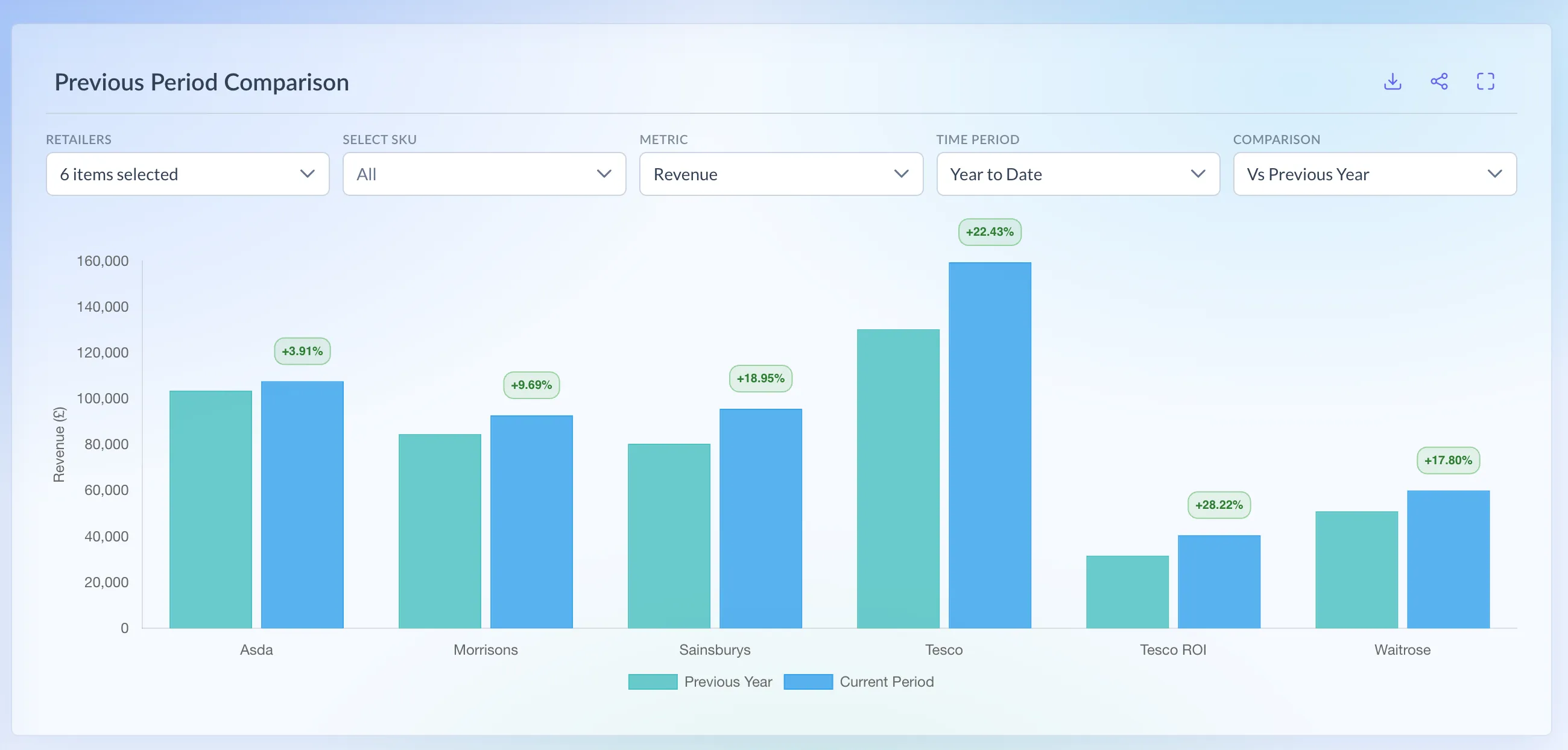
Shown on demo data.
What it shows
Section titled “What it shows”- One pair of bars per retailer: Previous Year (or Previous Period) and Current Period.
- The % change above each pair, green for growth and red for a fall.
- Revenue (£) or units, for all your SKUs or one SKU.
How it’s worked out
Section titled “How it’s worked out”% change = (current period minus comparison period) ÷ comparison period × 100
- The change is shown to 2 decimal places.
- Every period is made of whole weeks, Monday to Sunday.
- Vs Previous Year compares the same week numbers a year earlier: weeks 10 to 21 this year against weeks 10 to 21 last year.
- Vs Previous Period compares the same number of weeks, ending just before the current period starts.
The time periods are:
- Last Week and Last 4, 12, 26 or 52 Weeks: complete weeks, ending last Sunday.
- Year to Date: from the week containing 1 January to the end of this week, so it includes the current, unfinished week.
- Last Year: from the week containing 1 January last year to the week containing 31 December.
- Custom Time: the weeks you pick.
Which retailers have it
Section titled “Which retailers have it”It’s one page under All Retailers, covering these retailers where your brand is supplied:
- Asda
- Morrisons
- Ocado
- Sainsbury’s
- Tesco
- Tesco ROI
- Waitrose
Booths, Holland & Barrett and CLF aren’t on this page yet.
Using the page
Section titled “Using the page”- In the menu, open All Retailers and choose Prev Period Comparison.
- Retailers: all of yours are ticked. Untick any you want to leave out.
- Select SKU: pick one SKU, or leave it on All.
- Metric: Revenue or Units.
- Time Period: Year to Date is the default. For Custom Time, click the date box, pick a start and an end week, and click Apply.
- Comparison: Vs Previous Year (the default) or Vs Previous Period.
The page doesn’t save your choices. It opens on the defaults each time.
Full View adds a table with a row for each period and a column per retailer. Download gives you the same figures as a CSV.
Reading the numbers
Section titled “Reading the numbers”- Year to Date reads low early in the week. It includes the current week as far as it’s loaded, against the same week last year in full.
- +0.00% can mean there’s nothing to compare with. A retailer with no sales in the comparison period shows +0.00%, not a real change.
- A retailer with no sales in the current period isn’t shown, even if it sold in the comparison period.
- Ocado data starts in the week of 27 October 2025, so any comparison reaching further back reads high. Year to Date against last year compares properly from January 2027.
- Waitrose weeks run Sunday to Saturday, so they’re a day out of line with the other retailers.
- The table’s Total row adds the two periods together. Read the two period rows instead.