

Weekly Summary Table
Weekly Summary Table puts each customer on a row and each of the latest weeks in a column, with the quantity and net sales WFL invoiced for your brand. It’s the quickest way to see who bought in this week, and who has gone quiet.
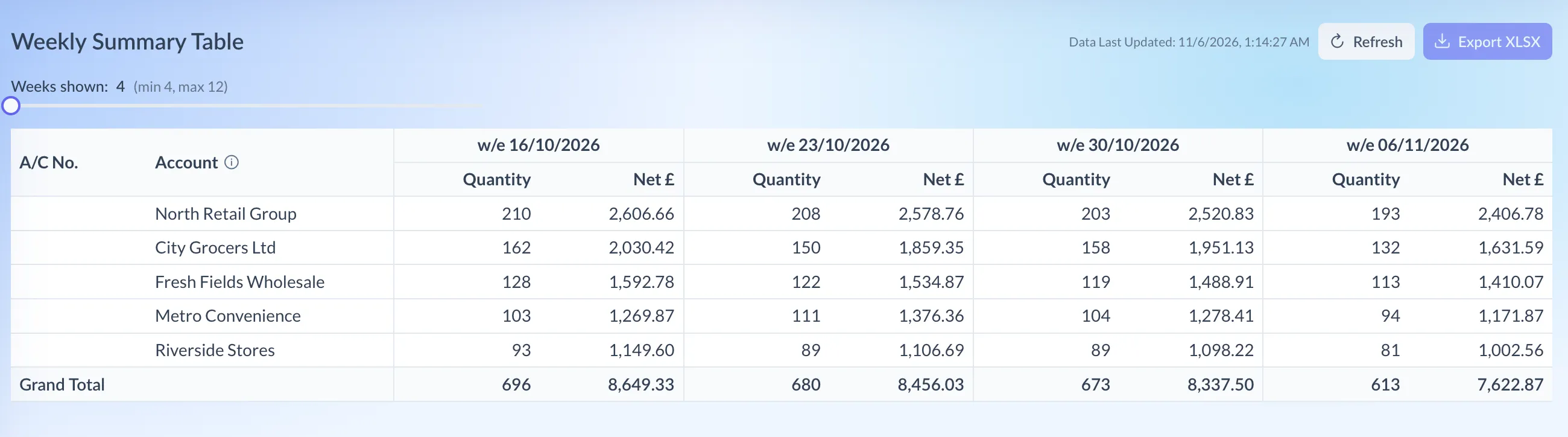
Shown on demo data.
What it shows
Section titled “What it shows”- A row per customer, with its A/C No. (WFL’s account code) and Account name, sorted by account code.
- A pair of columns per week, headed with the week-ending date, for example w/e 30/10/2026. Under each are Quantity and Net, before VAT. Weeks run oldest on the left to newest on the right.
- Grand Total underneath, adding up every customer for each week.
A blank cell means nothing was invoiced to that customer in that week.
Using the page
Section titled “Using the page”- Click WFL Sales at the top of Pivot, then choose Weekly Summary Table under Reports.
- Drag Weeks shown to see between 4 and 12 weeks. It starts at 4, and the table reloads when you let go.
- If the weeks shown include more than one currency, pick one with Currency. It starts on pounds. All adds every currency together, and the page warns you that no conversion is applied.
Nothing is saved. Next time, the page opens on 4 weeks and pounds again.
Reading the numbers
Section titled “Reading the numbers”- Each week is one of WFL’s weekly uploads. The column holds the invoices WFL loaded for that week, labelled with the week-ending date it chose. So an invoice in a column can be dated outside the seven days before it.
- Weeks are the same for every brand. If your brand had no sales in one of WFL’s recent weeks, that week still shows, with blank cells.
- The Net heading shows the currency, for example Net £. With All it just says Net, and the figures mix currencies, so use it only for a rough view.
- One customer, one name. Pivot groups lines by WFL’s account code and shows the name used most often for it. Hover the ⓘ icon by Account for more.
- There are no comparisons. The table doesn’t compare with earlier weeks or last year, and there’s no total across the weeks for a customer.
Downloading
Section titled “Downloading”Export XLSX, at the top right, downloads the invoice lines behind the weeks shown, one row per line, in the currency you’ve picked (every currency with All). It isn’t a copy of the table: to rebuild it, group the lines by A/C No. and WE Date in your spreadsheet.