

Service Level
Service Level shows how well a retailer’s orders were met: from what it asked for, how much was ordered, how much arrived, and where the gap opened up. Tesco and Ocado each have their own page, laid out the same way.
Which retailers have it
Section titled “Which retailers have it”- Tesco
- Ocado
Other retailers, Tesco ROI included, don’t send us service level figures, so they don’t have the page.
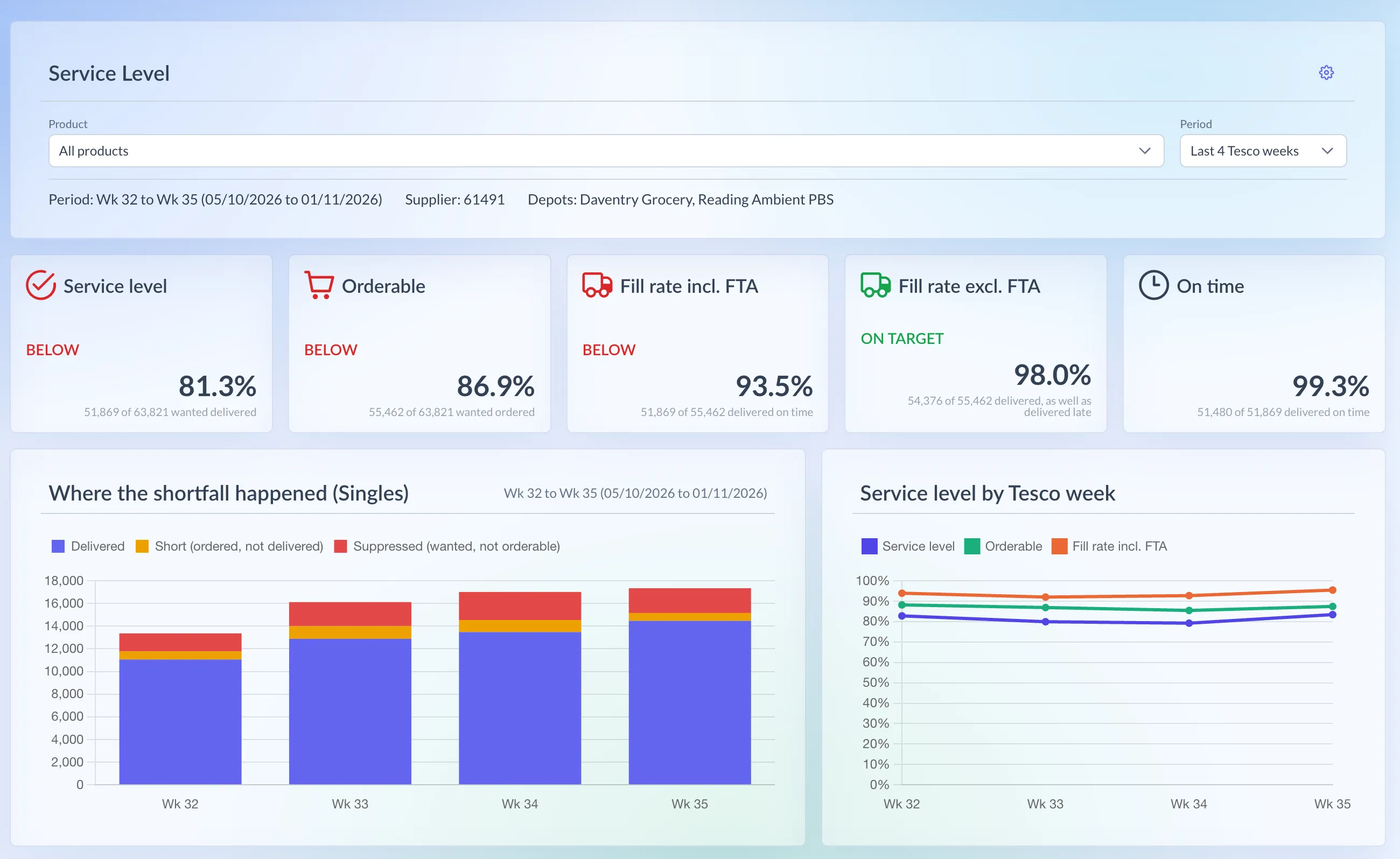
Shown on demo data.
What it shows
Section titled “What it shows”- Wanted: what Tesco’s replenishment wanted to order.
- Suppressed: wanted, but not orderable, because the line was suppressed for low or no stock.
- Ordered: the orders Tesco placed.
- Delivered: what arrived at Tesco’s depots.
- Short: ordered but not delivered.
How it’s worked out
Section titled “How it’s worked out”Service level = Delivered ÷ Wanted
- Orderable = Ordered ÷ Wanted.
- Fill rate incl. FTA = Delivered ÷ Ordered, as Tesco reports it.
- Fill rate excl. FTA = (Delivered + failed to arrive) ÷ Ordered. FTA (failed to arrive) units missed the time or date Tesco asked for. They travel on Tesco’s own freight, so they’re usually delivered late rather than not at all.
- Percentages are worked out from totals, never averaged, and always in singles.
Using the page
Section titled “Using the page”- In the menu, open Tesco and choose Service Level. Or press Ctrl K (⌘K on a Mac) and type “service level”.
- Choose a Product, or leave it on All products.
- Choose a Period: Last 4 Tesco weeks (the default), 8, 13, 26 or 52 weeks, Year to date, All time or Custom range.
- Open the settings (the cog) for Graph Settings: pick a Depot, and Singles or Cases.
Reading the numbers
Section titled “Reading the numbers”- The cards show Service level, Orderable and both fill rates, each with a status: On target at 98% or more (Tesco’s expectation), Watch from 95%, Below under that. An On time card appears only when Tesco reports late units.
- Where the shortfall happened splits each week’s Wanted into Delivered, Short and Suppressed.
- Service level by Tesco week tracks Service level, Orderable and Fill rate incl. FTA. For a period longer than 26 weeks it groups by Tesco period, and beyond three years by quarter.
- By product lists the lowest service level first. Expand a row to see it by depot and day (older history shows one row per Tesco week).
- Short deliveries by reason appears when something was short: failed to arrive, supplier shortage or back-scheduled.
The Last … Tesco weeks periods and Year to date end on the last Sunday held, so a part week never skews the headline. Tesco revises recent days as late deliveries come in. History starts on 5 January 2026.
Ocado amends its own orders after placing them, so its page shows two service levels: against the confirmed order, as Ocado measures it, and against what Ocado first ordered.
What it shows
Section titled “What it shows”- Ordered: what Ocado first ordered.
- Amended: what Ocado’s ordering system took off the order afterwards.
- Confirmed: the order after Ocado’s amendments.
- Received: what arrived.
- Short: confirmed but not received.
Figures are in units, by delivery date.
How it’s worked out
Section titled “How it’s worked out”Service level = Received ÷ Confirmed
- Service level vs original = Received ÷ Ordered.
- Amended % = Amended ÷ Ordered.
- A cancelled line counts as ordered and not received.
Using the page
Section titled “Using the page”- In the menu, open Ocado and choose Service Level.
- Choose a Product, or leave it on All products.
- Choose a Period: Last 4 weeks (the default), 8, 13, 26 or 52 weeks, Year to date, All time or Custom range.
- In Graph Settings (the cog), pick a CFC (Ocado’s customer fulfilment centres), or leave it on All CFCs.
The preset periods end on the Sunday on or before the newest delivery held, so the weekend’s deliveries are in.
Reading the numbers
Section titled “Reading the numbers”- The cards show Service level, Service level vs original and Amended by Ocado. Only Service level gets a status: On target at 95% or more (Ocado’s target), Watch from 90%, Below under that. A sentence underneath explains the gap between the two.
- Where the shortfall happened splits each week’s order into Received, Short and Amended by Ocado.
- Service level by week tracks both service levels.
- By product lists the lowest service level first. Expand a row to see it by CFC and delivery date, then a delivery for its purchase order lines. Deliveries before November 2025 show one row per Ocado week (Saturday to Friday).