

Stores Selling
Stores Selling counts stores. For each SKU and week it shows how many stores the retailer ranges it in, how many sold it and how many held stock. It’s the quickest way to see whether a SKU is gaining or losing distribution, and whether the stores that are meant to carry it actually do.
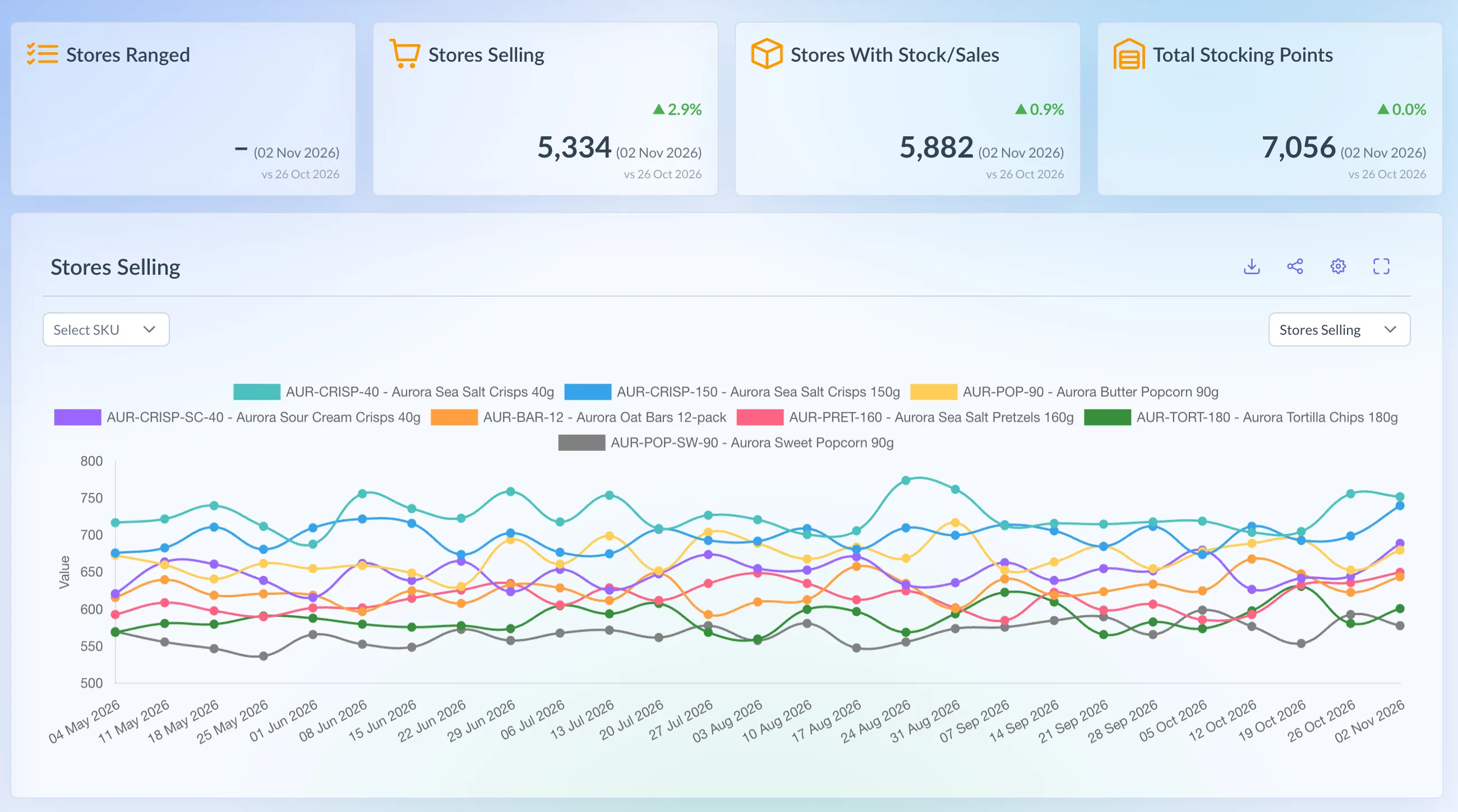
Shown on demo data.
What it shows
Section titled “What it shows”There are four metrics. Each is a count of stores for one SKU in one week (Monday to Sunday).
- Stores Ranged: stores where the retailer has the SKU on the store’s range, so the store is meant to carry it.
- Stores Selling: stores that sold at least one unit on any day of the week.
- Stores With Stock/Sales: stores that sold the SKU or held stock of it on any day of the week. At Booths, a store where the SKU is ranged counts too.
- Total Stocking Points: stores that held stock on any day of the week. Despite the name, it’s a count of stores, not a total of stock.
Which retailers have it
Section titled “Which retailers have it”- Asda
- Booths
- Morrisons
- Sainsbury’s
- Tesco
- Tesco ROI
Booths doesn’t send store stock, so it has no Total Stocking Points. Tesco doesn’t supply ranging for Ireland, so Tesco ROI has no Stores Ranged. Waitrose and Holland & Barrett don’t send store-level stock, CLF is a wholesaler with no stores, and Ocado is online only, so none of them have the page.
The Tesco, Tesco ROI and Morrisons Overview pages show the same chart.
Using the page
Section titled “Using the page”- In the menu, open a retailer and choose Stores Selling. Or press Ctrl K (⌘K on a Mac), type “stores selling” and pick the retailer.
- Leave Select SKU empty for a line per SKU, and choose the metric from the dropdown on the right. It starts on Stores Selling.
- Or pick one SKU to see every metric as its own line. The metric dropdown goes away.
- Under Settings (the cog), pick the Date range: All, 6 Months (the default), 12 Months or Custom. The page is always weekly.
- Save remembers your date range, metric and SKU for Stores Selling at every retailer. Reset goes back to the defaults.
Reading the numbers
Section titled “Reading the numbers”- The cards show each metric for the latest week, with the change on the week before.
- Stores Ranged is a dashed, stepped line when one SKU is picked, since ranges change in steps. A week with no ranging leaves a gap, not a 0.
- Full View (the expand button) adds a table with a column per week, and a Total row when all SKUs are shown. Download saves the rows as a CSV.
- The latest week fills in day by day, so it reads low until the week is complete.
- Ranging history varies. Morrisons ranging starts in the week commencing 26 October 2026, and Tesco’s latest week of ranging can lag the other lines.
- Asda and Sainsbury’s store stock starts in September 2025 and late December 2025. Earlier weeks show 0 Total Stocking Points.