

Stock & Reorder
Stock & Reorder answers one question: am I about to run out at CLF? It lists every SKU with the stock CLF holds, how fast that stock has been going out, and how many days it will last at that rate, shortest cover first.
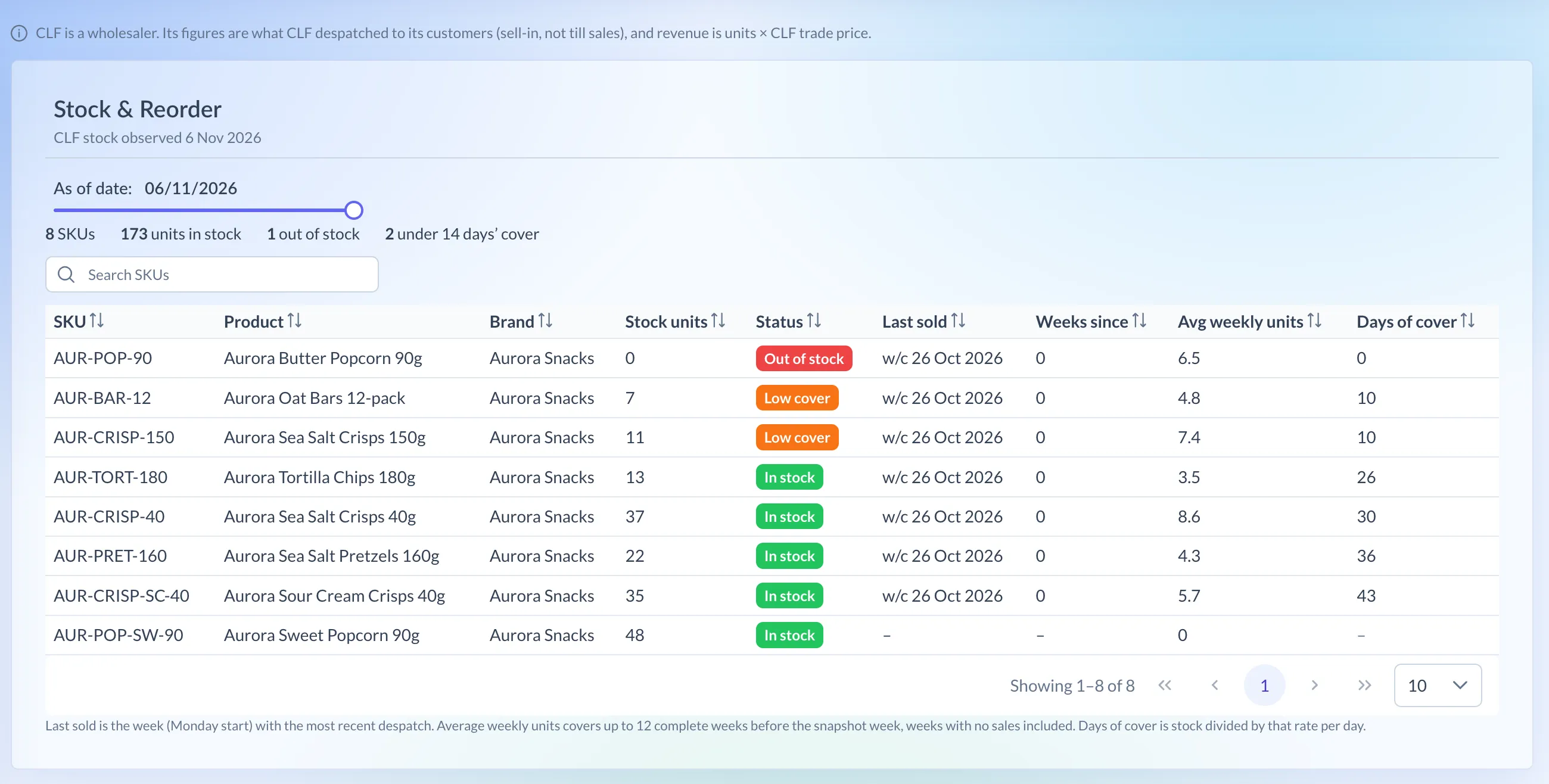
Shown on demo data.
What it shows
Section titled “What it shows”CLF is a wholesaler. Its sales figures are what CLF despatched to its own customers, not sales to shoppers. So days of cover tells you how long CLF’s stock will last at the rate CLF is shipping it, not how much is on shop shelves.
| Column | What it means |
|---|---|
| Stock units | Units CLF held on the snapshot date |
| Status | Out of stock at 0 units or fewer, Low cover when in stock with under 14 days of cover, otherwise In stock |
| Last sold | The week (Monday start) of the most recent despatch |
| Weeks since | Whole weeks from Last sold to the latest week with any despatches |
| Avg weekly units | The average units a week, explained below |
| Days of cover | How many days the stock lasts at that rate |
How it’s worked out
Section titled “How it’s worked out”Days of cover = stock units ÷ (avg weekly units ÷ 7)
- Avg weekly units covers up to 12 complete weeks before the snapshot’s week. Weeks with no despatches count as 0, so a SKU that sells only now and then isn’t overstated.
- The snapshot’s own week is left out, because it isn’t finished yet.
- Avg weekly units is shown to 1 decimal place and days of cover in whole days.
- Days of cover shows a dash when nothing went out in those weeks. There’s no rate to work from, which isn’t the same as 0 days.
Which retailers have it
Section titled “Which retailers have it”- CLF
CLF has one distribution point and no stores, so the store reports don’t apply to it, and days of cover is the measure that matters. For retailers with stores, stock and cover by store are on Store Performance.
Using the page
Section titled “Using the page”- In the menu, open CLF and choose Stock & Reorder.
- The page opens on the newest stock snapshot, shown as “CLF stock observed” and the date.
- To look at an earlier day, drag the As of date slider. The page then tells you the newest date.
- Type in Search SKUs to find a SKU by code, product or brand.
- Click a column heading to sort by it.
Reading the numbers
Section titled “Reading the numbers”- The summary above the table counts your SKUs, the units in stock, the SKUs out of stock and those under 14 days’ cover.
- The table starts with the shortest cover, then the highest weekly units. SKUs with no cover figure come last.
- A Low cover SKU that sells steadily is the one to reorder first.