

Master
Master lists every line WFL has invoiced for your brand, one row per product on each invoice, newest first. Use it to find a particular invoice, check what a customer was sent, or download the lines to work with in a spreadsheet.
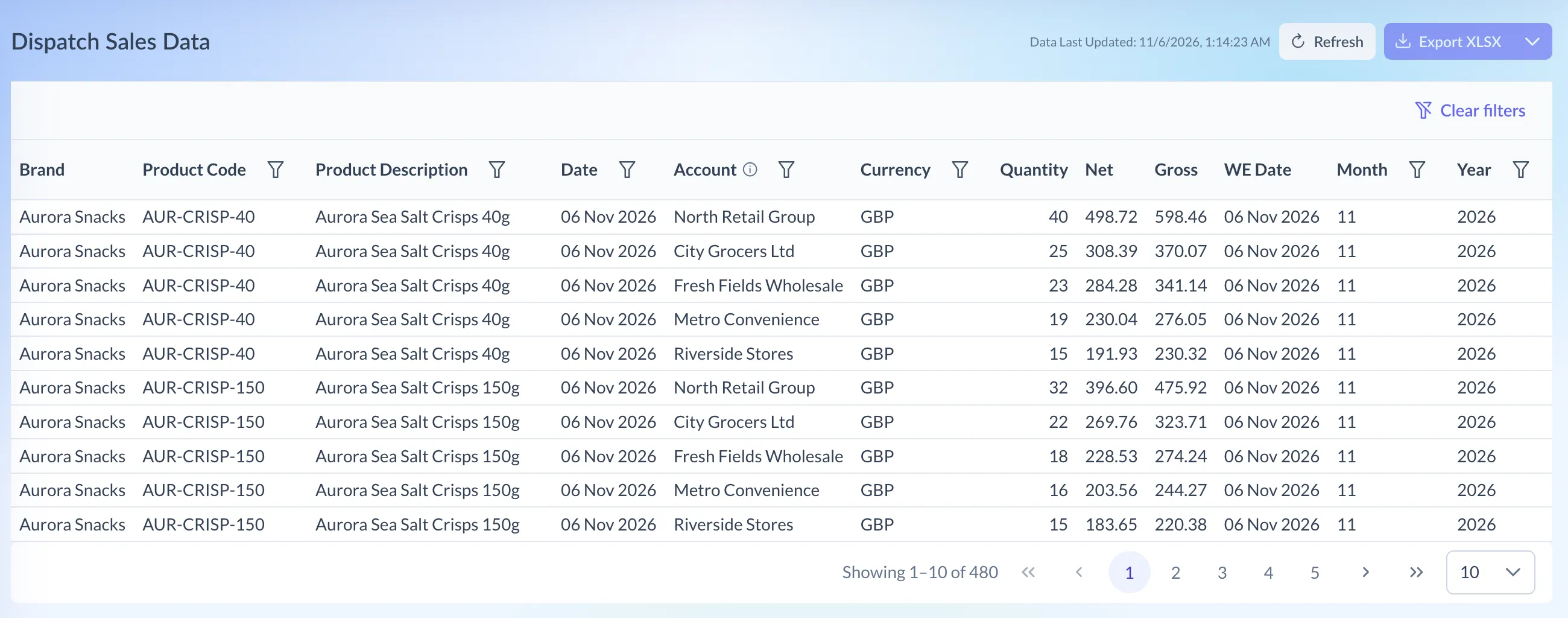
Shown on demo data.
What it shows
Section titled “What it shows”The page is headed Dispatch Sales Data. Each row has:
- Brand, Product Code and Product Description
- Date, the invoice date
- Account, the customer. Hover the ⓘ icon for how names are grouped (see below).
- Currency: GBP, USD or EUR, as invoiced
- Quantity, as invoiced
- Net, before VAT, and Gross, both in the line’s own currency
- WE Date, the week-ending date of the weekly upload the line came in
- Month and Year, from the invoice date
There are no totals on this page. For totals, use Sales Overview or download the lines.
Using the page
Section titled “Using the page”- Click WFL Sales at the top of Pivot, then choose Master under Reports.
- To narrow the list, open the filter menu on a column heading:
- Product Code, Product Description, Account and Year take text to search for.
- Date takes a day, with Date is, Date is before or Date is after.
- Currency lets you tick one or more currencies.
- Month takes a month, in any year.
- Filters on different columns work together. The count under the table covers every matching line, not just the page you’re on.
- Clear filters, above the table, removes them all.
The list is always newest invoice first, and the columns don’t sort. Show 10, 25, 50 or 100 lines a page. Filters and page size reset when you leave the page.
Reading the numbers
Section titled “Reading the numbers”- Mixed currencies sit side by side. A page can hold pound, euro and dollar lines together, and Pivot never converts them. Filter on Currency before adding up Net.
- One customer, one name. Pivot groups lines by WFL’s account for the customer and shows the name used most often for it, so spelling differences on invoices don’t split a customer.
- The Account search looks at the name on each invoice, which can differ from the name shown in the column.
- Before and after include the day. Date is before 1 March includes lines dated 1 March.
- WE Date and Date can differ. WE Date is the week WFL uploaded the line in, so the invoice date isn’t always in the seven days before it.
Downloading
Section titled “Downloading”Export XLSX, at the top right, downloads the lines that match your filters, newest first. Choose All Data from its menu to download every line for your brand instead. The file has the invoice number, VAT and order numbers as well as the columns on screen. Its account names are as written on each invoice.